
Features
All FollowNet features — what the app actually has
A complete list of shipped features in the iOS app and Chrome extension: protocols, Smart Connect, Auto-connect, DNS, Network Profiles, Speed Test, widgets, Shortcuts, Free/Premium, and more.
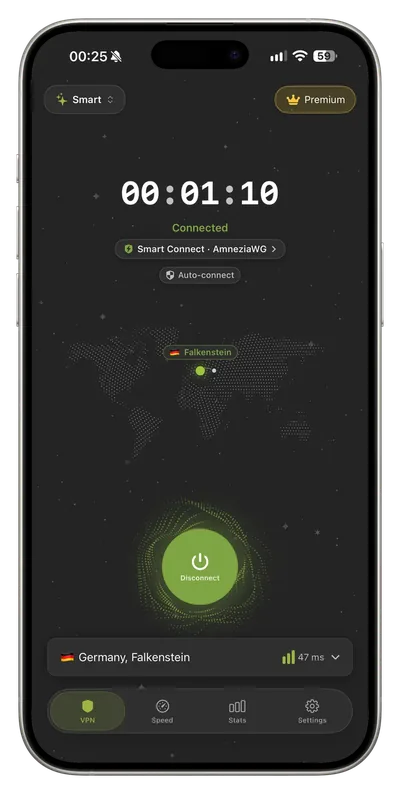
One-tap VPN on iPhone & iPad
Full-device tunnel via Apple Network Extension. Open the app, tap connect, and traffic goes through FollowNet. Universal app for iPhone, iPad and Mac — same account and settings.
VPN Protocol: Smart, WireGuard, IKEv2, AmneziaWG, Hysteria2
In Settings → VPN Protocol you choose: Smart (recommended), IKEv2, WireGuard, AmneziaWG (when the server supports it), or Hysteria2 (QUIC + obfuscation when available). Lock a protocol manually anytime.
Smart Connect
Smart mode picks a working protocol from WireGuard, AmneziaWG, Hysteria2, and IKEv2 based on the network, with fallback if the handshake fails — so “one tap” still works on restrictive links without you becoming a protocol engineer.
Servers: Optimal location, ping, Free / Premium / Favorites
Server list with filters All / Free / Premium / Favorites. Optimal location picks by ping. Premium locations stay locked until you subscribe. Star favorites for quick reconnect.
Auto-connect
Settings → Auto-connect: Disabled, Wi‑Fi Only, LTE Only, or Always. Uses iOS on-demand rules so the VPN can come up when you join the selected network type — useful for public Wi‑Fi and travel.
DNS profiles
Settings → DNS: Default, Cloudflare (1.1.1.1), Google (8.8.8.8), AdGuard, AdGuard Family, or Quad9 (9.9.9.9). Pick a resolver for privacy, speed, or family filtering without a separate DNS app.
Network Profiles
Presets Smart, Public WiFi, and Travel — each bundles protocol + DNS + auto-connect + server mode (Fastest / Last used / Specific server). Create custom profiles (Free up to 2, Premium up to 5) for home, work, or roaming.
Speed Test
Dedicated Speed Test tab while VPN is connected: download, upload, latency, and jitter — measure the tunnel before you settle on a server habit.
Statistics
Statistics tab: today (time, sessions, traffic), weekly overview, sessions, longest day, data used, and active days — including Free weekly traffic cap visibility.
Home Screen widget
VPN Status widget (small and medium): connection status, country/city/flag, session timer, and ping. Deep link back into the app when you need to sign in or reconnect.
Apple Shortcuts
Shortcuts Automation: Connect FollowNet VPN, Disconnect FollowNet VPN, and Apply VPN Profile — wire FollowNet into your own automations (arrive home, join Wi‑Fi, etc.).
Account & devices
Start Free (guest), email + one-time code, Sign in with Apple, or Google. Account shows plan, devices, and traffic. Free up to 2 devices; Premium/trial up to 5. Logout and Delete Account in App Settings.
Free vs Premium
Free: weekly traffic quota and core servers so you can try a real tunnel. Premium: unlimited traffic, all servers, up to 5 devices, ad-free. Subscribe or restore via the App Store; manage the subscription in Apple’s subscription settings.
Help, languages, legal
In-app Help & Support (connection, payments, auto-connect, DNS, account). Languages follow iOS (en, ru, uk, es, de, fr, pt). Info screen: version, website, Privacy Policy, Terms.
Chrome extension
Browser proxy for Chrome (SOCKS/HTTPS): connect/disconnect, server list with ping and favorites, session timer, statistics, Free/Premium. Kill Switch blocks Chrome internet if the proxy drops. Ad blocking via EasyList + AdGuard filters. Shortcut Alt+Shift+F. Not a full-device VPN — desktop browser only.
Privacy tools
Multi-hop (Premium): traffic goes through two countries. Tor server (Premium): connect through the Tor network, slower than regular servers. Split tunneling: send only chosen sites and services through the VPN, or keep them outside it. Local network access: printers, AirPlay and your router stay reachable. Privacy check: see the IP sites see and test DNS and IPv6 leaks in the app.
Honest limits
Split tunneling works by site and address, not by individual iPhone app, because iOS reserves per-app VPN for managed devices. Multi-hop and Tor are slower than a single server.
Key points
- Smart Connect + WireGuard · IKEv2 · AmneziaWG · Hysteria2
- Auto-connect · DNS · Network Profiles
- Speed Test · Statistics · Widgets · Shortcuts
- iOS full-device VPN + Chrome proxy (Kill Switch & adblock)
Try it today
Free, no card, ready in a couple of minutes.