
Guide
Split tunneling on iPhone: choose what goes through the VPN
Split tunneling lets you send only some traffic through the VPN and leave the rest on your normal connection. Here is how it works in FollowNet and when to use it.
What to know
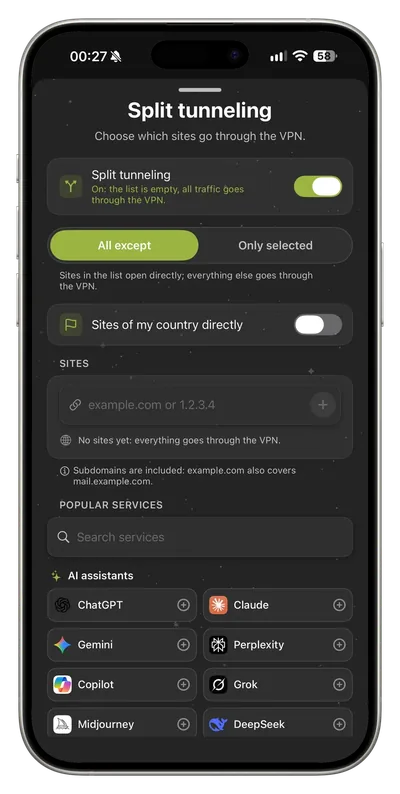
A VPN normally carries everything. That can slow down a banking app, a local streaming service or a site that refuses VPN addresses. Split tunneling works in two directions: send only chosen services through the VPN, or keep chosen ones outside it while the rest stays protected.
How to use it
Open Settings → Split tunneling. Pick services from the ready-made presets, or add sites, IP ranges and countries yourself. Then choose the direction you want. FollowNet applies the rules on your next connection.
Limits and honest expectations
Anything left outside the tunnel uses your normal connection, so it is not protected and sites see your real IP. Keep public Wi‑Fi use fully inside the VPN. Rules work by site and address, not by individual iPhone app, because iOS reserves per-app VPN for managed devices.
Key points
- Free includes a weekly traffic allowance
- Current plan details always appear in the app
Try it today
Free, no card, ready in a couple of minutes.